Showing posts with label picasa collage. Show all posts

Wednesday, 17 July 2013

How to take great summer photos - tip 6 (Cheshire photography course with Picture It Big)

This is my favourite of the top tips so far...

BE CREATIVE, EXPERIMENT AND HAVE FUN!

This sounds like it could be the introduction to a totally different topic, but we are still talking photography!

Digital photography is brilliant because you can play about as much as you like, take dud pictures and just delete them - at no cost. With apps and different settings you can get some really great effects. I've never done Instagram personally, only because I'm an android girl, but I've got some great apps on my phone that I use a lot for my fun photos. My favourite is Retro Camera - it's really easy to use and has about 6 or 7 different camera effects.

Most of the pics on the left have been taken using this app and a few had effects applied in Picasa - free image editing software from Google (more on this in the 7th and final post of this series).

A word of caution - don't over do the effects - don't use them for every picture and make sure it's still a photo worth taking. It should still be well composed, in focus and correctly exposed. Don't use effects to disguise a bad photo - it never works.

I like to make photo books, calendars and all sorts of stuff so that I can enjoy and share my photos (again more on this in tomorrow's post), and this sort of fun, creative shot gives some variety to whatever it is I'm making.

I also like to capture shots of details that remind me of my holiday or that special day. I love trying to do abstract shots too. This next collage has some great examples.


The more you experiment the more you learn so get playing with those settings and apps!

And if you like the collages learn how to create them in Picasa by reading my blog about it! Here to serve!

By Jane Burkinshaw. Share this post by clicking on one of the Share buttons on the right hand side. I'd love to hear your comments too!

Tuesday, 7 May 2013

How to make amazing picture collages (Cheshire photography course with Picture It Big)


I love picture collages and use them a lot! Ive got framed collages with holiday pictures hanging in the downstairs loo and one beautiful large one of black and white pictures of the kids as babies framed and hanging in our bedroom. Every time I look at it I spot a different picture!


Whenever I use these collages people admire them and ask me how I made them - well here's how!

  1. Download a free piece of software from Google called Picasa.


Picasa is dead useful - it's a photo library that allows you to look at all the photographs on your computer, do simple editing on them and create some really fun and useful stuff. It's aimed at your normal family user so it's really user friendly and intuitive to use.


Once you've downloaded Picasa and told it which folders to look in for pictures (it might take a while to find all the pictures especially if you have a lot!) then you will see a screen like the one above. Scroll down and you will see all your pictures in one continuous stream.

Click on an image to see a larger version - you can do lots of cool edits on it here too - have a play with them all - you can easily undo any changes by pressing the "undo" button.

If you want to use this image in your collage, then press the little green button at the bottom by the "tray" to keep it there. Carry on selecting other images to include in your collage and hold them in the tray at the bottom by pressing the green button. You can select as many images as you like - I've done a collage with over 300! You need at least 3 though! You can select from any folder on your computer simply by scrolling down. Remember to hold the pic in the tray with the green button!
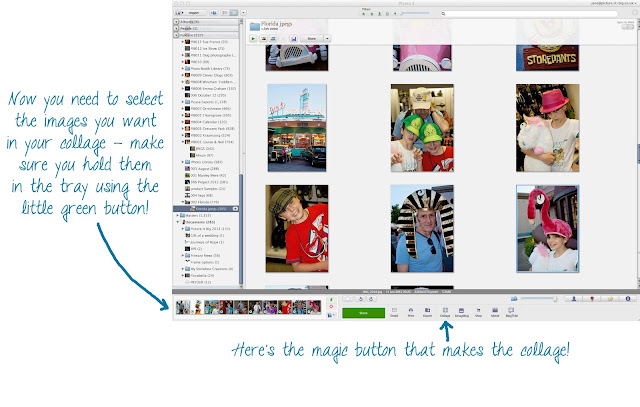
Once you have selected all your images you're ready to make your collage. Along the bottom of the screen there are a number of options, including one to make a collage. If it isn't shown, then right click on one of the other buttons at the bottom and you'll get this pop up window:


Make sure you add in the collage button and then press OK and close the window. If you have problems with this, you can use the menu at top of the page: Create / Create Picture Collage.

The first time you make a collage you will probably see a pile of pictures scattered randomly. I don't often use this "Picture Pile" option - I prefer the mosaic option but have a play with all the of the types of collages by clicking on the drop down arrow.


Choose what size you want your final collage to be - if you are going to print it out then select the appropriate size for your final print. You can choose landscape or portrait too (just under "page format").

If you are not happy with the layout, try "shuffle", or alternatively you can click and drag an image to a different position and the images will swap places. I've found that by playing around with the page format and switching between landscape and portrait I can get the layout I like best.

If you want to remove an image simply select it in the collage and click on "remove" just above the collage. There are a few other clever things you can do but I'll save those for a part II!

Once you are happy with the collage then go for it - click on "Create collage". It should only take a few seconds before you are looking at your masterpiece!


Have fun collaging! Watch out for the next blog on collages where we'll look at the following:

  • Adding text to your collage
  • Using funky colours for the borders
  • Re-sizing for Facebook etc
  • How to get your collage printed
By Jane Burkinshaw. Share this post by clicking on one of the Share buttons on the right hand side. I'd love to hear your comments too!


Monday, 28 January 2013

Booking your holiday? Book a photo course first! (Cheshire Photography Course with Picture It Big)

Click to enlarge

I've been sorting through and editing photographs from last year's holidays, a lovely job to do in January, banishing grey winter skies with blue ones and having all the memories of summer sunshine come flooding back (I'm talking about holidays abroad of course, with sunny days a rarity in the UK last year!).

In June we went to Florida, did Disney and Universal for the first time and then had several days in Naples, chilling out by the pool and on the beach. Needless to say it was an amazing holiday and we have so many great memories... and far too many photographs! Having decided to make a photo book and some collages for the kids' rooms I've been having a hard time deciding which shots to delete and which ones to use.

One disadvantage of the digital camera is there is almost no limit to the amount of images we take - and inevitably we take too many and I'm no exception! But as a professional photographer the vast majority of my shots are, as you'd expect, in focus, well composed and correctly exposed. This makes it hard to delete any but of course it's great to have so many lovely photographs.

I'm just about getting there now, having reduced around 800 photos to more like 300 to include in the photo book. I'm going to ask the kids to select about 50 of their favourite pictures to create a poster sized collage for their rooms. In this way our once in a lifetime holiday will continue to live on in our minds and the photographs won't be hidden away on my hard drive.

If you are planning your holidays for 2013 and would like to learn how to take better photographs, book a one to one session with me. I can tailor the training to your needs, whether you use a camera phone, compact camera or SLR. And if you would like to know how to best edit your pictures and how to create stunning collages and photo books I can show you how to do that too.

By Jane Burkinshaw. Share this post by clicking on one of the Share buttons on the right hand side. I'd love to hear your comments too!


Tuesday, 8 November 2011

Venice revisited and revamped

I found a gorgeous book on Venice and its food in a discount book store today ("Venezia - food & dreams" by Tessa Kiros). In all honesty it's doubtful that I'll cook any of the recipes in it but it brought a whole raft of memories tumbling back and I just had to have it. In 2007 Nic and I went to Venice to celebrate a landmark birthday (his not mine!) and our wedding anniversary. In some ways it wasn't the perfect time of year to go - mid January - but it did mean that it wasn't swamped with tourists and the damp cold weather was preferable to unrelenting heat and its accompanying eau de sewage. It was a truly magical weekend - if you've been you'll know exactly what I mean and if you haven't make sure you add it to your bucket list. There really is no where else like it on earth.

I was a keen amateur photographer back in those days and took oodles of very average pictures whilst we were in Venice. I was pleased with a handful of them (I've even sold one or two!) but had relegated the rest to a sub folder somewhere in the bowels of my computer hard drive. Today's book purchase inspired me to unearth and reappraise my Venice "snapshots", with the knowledge that these days I am more of a dab hand at editing images.

And I was very pleasantly surprised! With a little cropping, tweaking of exposure, levels and brightness I found I had around 20 very nice images. They're not of a professional standard and I'd hope that nowadays I'd produce much better, but I've been able to create a very attractive collage of memories that will eventually adorn the walls of our downstairs loo!


This is the final collage - I'm going to get it printed at around 30cm x 30cm. I've stolen the quotes from Tessa Kiros' book - I hope she doesn't mind as it's only for our loo - but they epitomise our weekend in Venice, especially the part about getting lost but it not being a problem. We set off from our lovely hotel each morning and just walked and walked. We stopped to eat when we were hungry, whiling away a few hours in cosy little bars serving prosecco and cicchetti (delicious bites!). We usually didn't have a clue where we were and only consulted a map when it was time to find our way back.

Just as a comparison I've created a collage of the images before any editing, to show just what a few simple tweaks can achieve. It makes an OK collage, but the final version (above) is much more vibrant and punchy, I like the occasional use of black and white and I love the addition of the quotes.


If you'd like to learn how to create very simple but really impactful and personal pictoral memories of special events in your life just get in touch. I run one to one tuition sessions at very reasonable prices. http://www.picture-it-big.co.uk/Onetoone.html. Even better get someone to treat you to it - I have gift vouchers too. All those photos should not be languishing hidden on your computer when they could be bringing back nice memories every day!

By Jane Burkinshaw. Share this post by clicking on one of the Share buttons on the right hand side. I'd love to hear your comments too!